Installation from Offline Installation Files#
Copy the ‘repository’ to a location your clients can access it. This location can be one of:
Network Share (SMB)
Web Server (HTTP/HTTPS)
Local Absolute Path (
C:\sofistik_mirror)
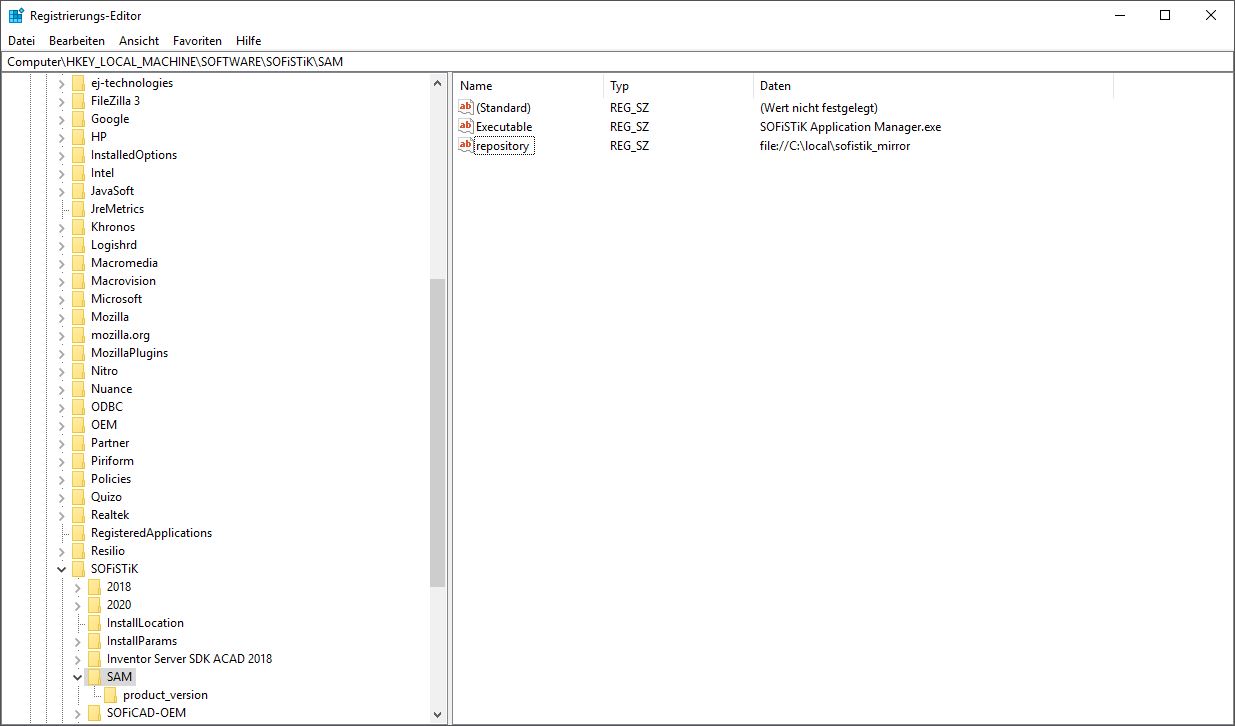
Point the client to your repository via
repositoryregistry key inHKEY_LOCAL_MACHINE\SOFTWARE\SOFiSTiK\SAM(for example, with reg.exe or regedit.exe).Key:
HKEY_LOCAL_MACHINE\SOFTWARE\SOFiSTiK\SAMName:
repositoryType:
REG_SZExamples for REG_SZ value:
Value:
file://C:\local\sofistik_mirroror Value:
file://server/sofistik_mirroror Value:
http://server/sofistik_mirroror Value:
https://server/sofistik_mirror
Your clients can now install our products as described in: Installation on a Single Computer using your offline files.
Service Pack Updates#
See Get Offline Installation Files to update your repository. Clients will then see available service packs in the SOFiSTiK Application Manager.